Structure
I’ve standardized on a file naming scheme of YYYY-MM-DD-post-title.md for my Hugo structure. And to help tidy things up a bit, I’ve started using Page Bundles to contain associated images, like this:
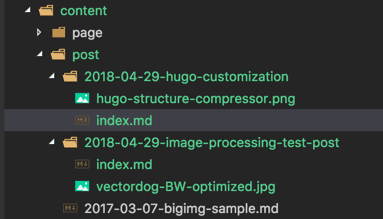
Which is called very simply (note the lack of path on the filename) with a custom shortcode:
{{< img "hugo-structure-compressor.png" >}}
But, note, the standard markdown formatting doesn’t quite work: 
That will work fine in the post, but it fails in the post excerpt with a 404.
Images & Shortcodes
In addition to the img shortcode, I also added one for Image Processing imageproc which can be used to Fit|Fill|Resize images.
Project Taxonomy
Projects were added in addition to tags. That’s how I keep track of things in my head most of the time, so it makes sense to make it official.
Theme Overrides
Of course, Project meta data doesn’t show up anywhere by default so I had to modify some of the theme files. Hugo makes that easy. Just copy the theme file to a matching folder in layouts and make your changes there. They’ll take precedence over the matching file in the theme. Hopefully that will make it easier if I decided to pull an upgrade from theme in the future.
For this change I had to modify single.html and then add in some CSS to match (additional.css). And then I had to link in the new css file in head_custom.html.
